
Appearance
Plans, seats and storage
A studio starts on the Free plan. Pro is paid per seat, every month or every year, and adds storage for each seat. Everything here is in Settings → Studio → Billing, which needs the studio permission Billing.
Free and Pro
| Free | Pro | |
|---|---|---|
| Price | Free | 29 € per seat per month, or 288 € per seat per year |
| Members | 1 member | No limit: each member is a seat |
| Storage | 1 GB | 250 GB per seat, shared by the studio |
| Extra storage | No | Blocks of 1 TB: 30 € per month or 330 € per year |
| Projects | 1 project | No limit |
| Spaces | 2 spaces | No limit |
| Items | 50 items | No limit |
| AI tokens every month | None: tokens come from packs | None: tokens come from packs |
Prices are in euros before VAT. One person can create up to 2 Free studios.
Enterprise, with high-volume storage, is on request. There is no free trial of Pro.
The Billing page
Billing lists its sections on its left, so you can jump to one: Billing information, Next invoice, Seats, Storage, AI tokens, Studios in account and Previous invoices. Once the studio has paid through Stripe once, Manage billing sits below them. AI tokens are explained in Buy token packs and follow usage.
Members without the Billing permission don't see this page. They see the studio's storage and tokens in the usage pill of the header: see Follow usage.
On the Free plan
A Free studio sees its Free plan at the top of Billing: how much of each limit it uses.
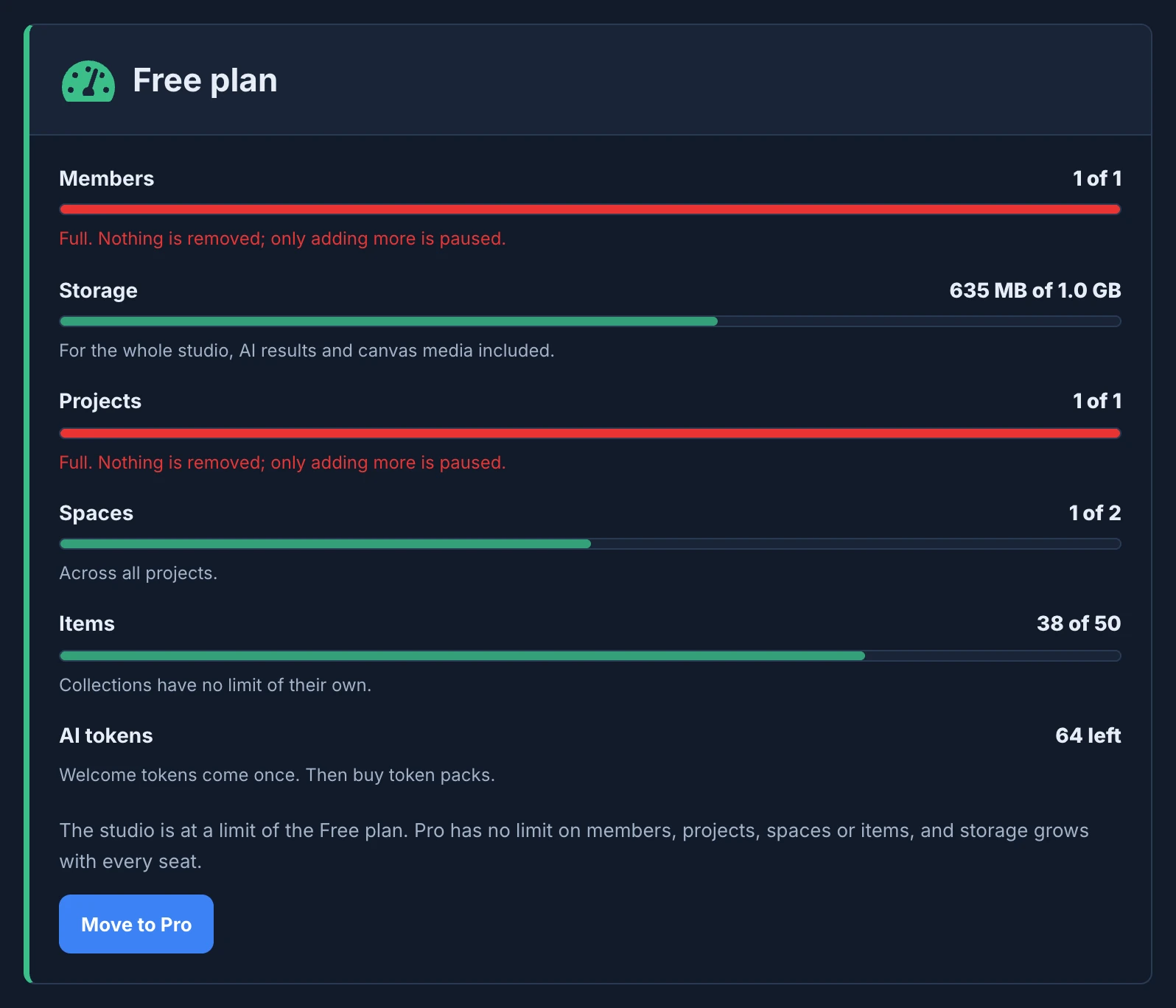
- Members: the people of the studio. Review guests never need a seat.
- Storage: for the whole studio, AI results and canvas media included.
- Projects: every project counts, active or not.
- Spaces: across all the projects.
- Items: collections have no limit of their own.
- AI tokens: how many are left. Welcome tokens come once; then you buy token packs.
A bar turns red when its limit is reached and says Full. Nothing is removed; only adding more is paused. Move to Pro starts the checkout.
On Free, read your limits here. The Seats, Storage and Next invoice sections below show Pro's prices and Pro's storage, which the studio would have after moving.
When a limit is reached
When someone in a Free studio invites a member, uploads, or creates a project, space or item beyond a limit, Animanager stops and says why. For example:
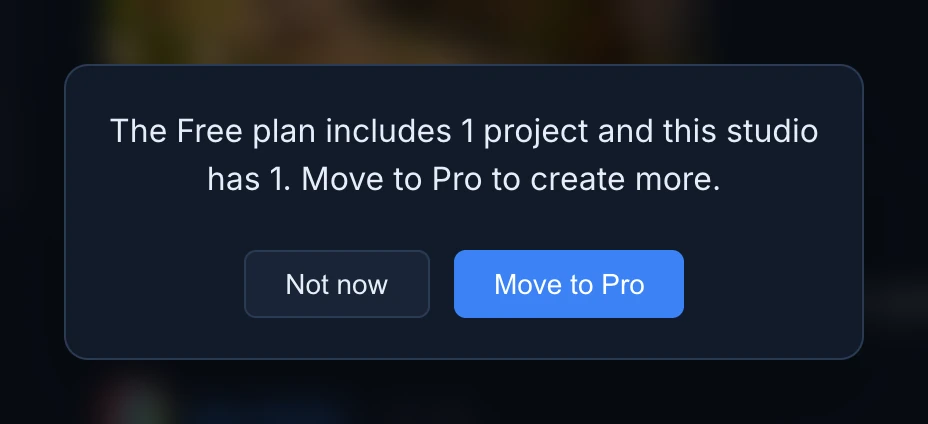
- Members who manage billing get Move to Pro, which opens Billing, and Not now. Everyone else gets the explanation with OK and Close.
- Uploads tell you how much the studio uses and how much the file adds: Storage limit reached. The Free plan includes 1 GB and this studio uses … Nothing is ever deleted: only adding more is paused.
- Someone who opens an invite link to a full studio is told The Free plan includes 1 member. This studio has no seat left. Ask a studio admin to move to Pro.
- The same notice doesn't show again for 30 seconds, so a batch of uploads shows it once.
On Pro, a revision that would take the studio above its storage pool is stopped before it uploads: This revision would exceed included studio storage. Add extra storage in Billing. See Storage.
Move to Pro
- Open Settings → Studio → Billing.
- Under Billing interval, choose Monthly or Yearly (2 months free). Yearly costs 24 € per seat per month, billed 288 € per seat once a year.
- Press Subscribe to Pro, or Move to Pro in the Free plan section.
- The checkout asks for the card, the billing address and the VAT ID, and adds VAT. You can enter a promotion code there. Tick the box that asks for the plan to start right away, and pay.
The studio moves to Pro when the payment goes through, and you come back to Billing. Subscription then reads Active. If it still says None, wait a moment and reload the page.
Billing information
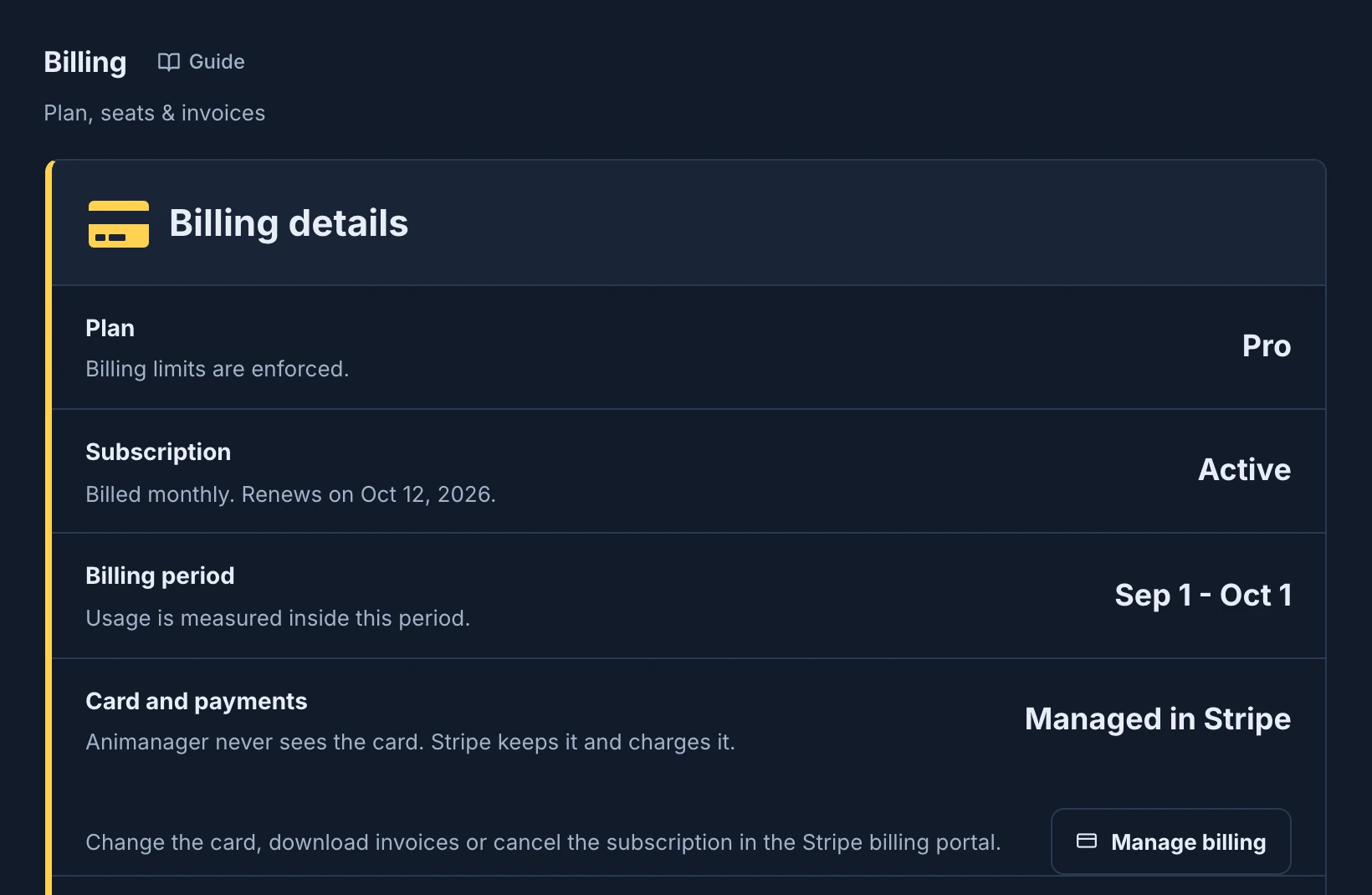
Billing details sums up where the studio stands:
- Plan: Free, Pro, or Courtesy for a studio from before plans had limits, which has none.
- Subscription: None, Active with the interval and the renewal date, Cancels at period end with the date access continues until, or Past Due when a payment failed.
- Billing period: the dates usage is measured in.
- Card and payments: Managed in Stripe once the studio pays. Animanager never sees the card: Stripe keeps it and charges it.
Below them, the Customer form says how invoices identify the studio: Individual or Company, Legal name, Company name, Tax ID / VAT, Billing email and Phone, and the Invoice address. Press Save billing information. Each studio keeps its own.
Next invoice
Next invoice estimates what the studio pays at the next renewal: the Seats, as billable seats times the seat price, and the Extra storage if it has some. AI tokens are not on it: each token pack is paid when bought, with its own invoice.
Seats
A seat is one active person, counted once across every studio billed on the same account. Archived members, Anibot and the guests of review links take no seat.
There is no seat count to set: when a member joins or leaves, the subscription follows, prorated. Seats shows the seat price, the billable seats and the total, and how the subscription follows:
- Charged on your subscription. Seat changes are prorated. All is up to date.
- Updating the subscription to N seats. A change is on its way.
- Could not update the subscription to N seats yet. Animanager keeps trying on its own, and members can keep joining meanwhile.
Add a seat invites someone new: Generate link gives you an invite link with the default role, and Copy copies it. To choose the role, invite from Members: see Invite people.
Storage
Pro includes storage for each seat, pooled for the whole studio: with five seats, Greenhouse Studio has 5 × 250 GB, about 1.2 TB. Storage shows what is Included per seat, the Included pool, the Used storage and what is Above the included pool.
To add more on Pro:
- Under Extra storage, press + once for each 1 TB block you need, or − to drop some. The total per month, or per year, shows next to them.
- Press Add storage or Remove storage to confirm, or Cancel.
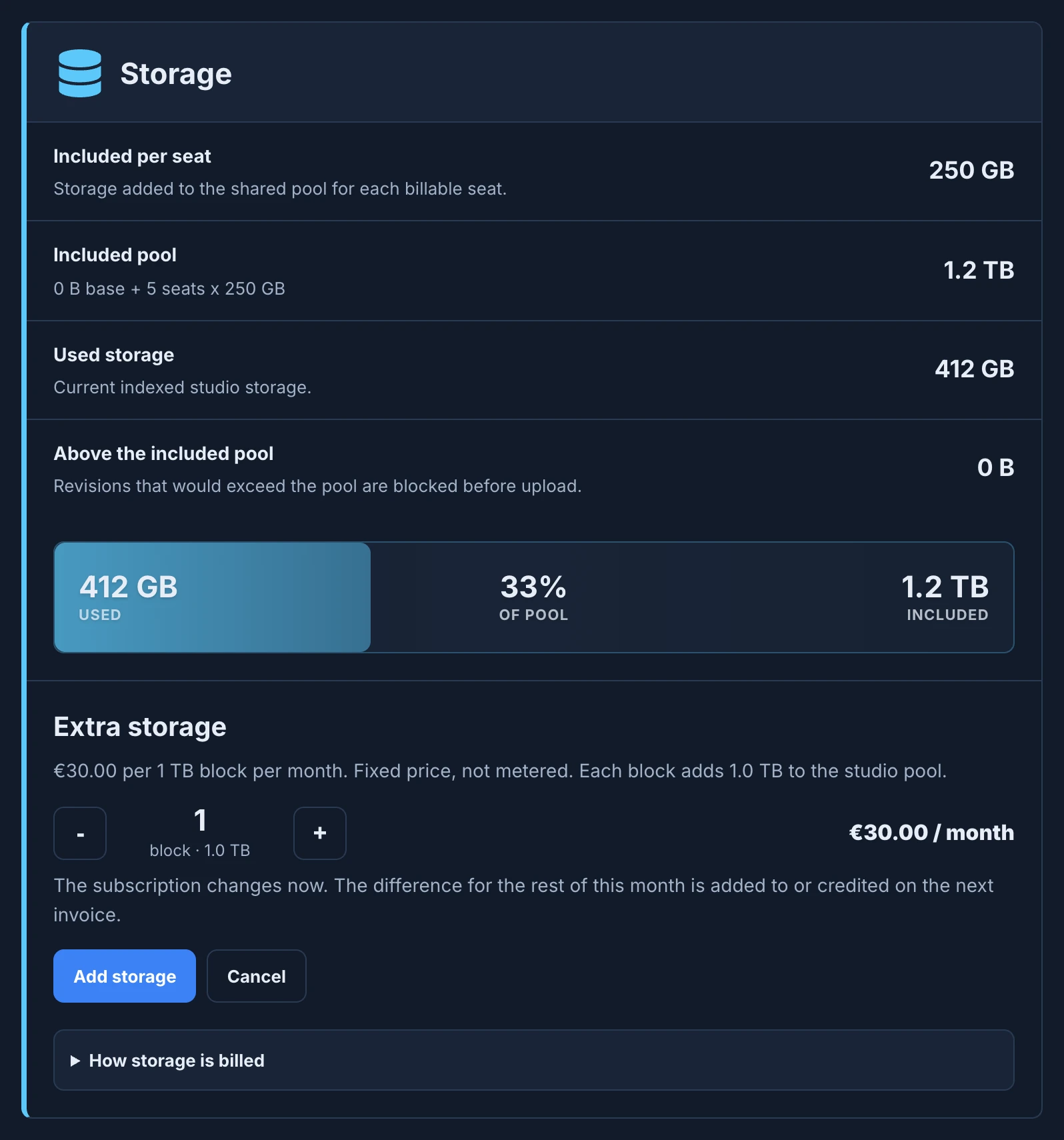
- A block costs 30 € a month, or 330 € a year on yearly billing. A studio can have up to 100.
- Blocks are billed with the subscription and prorated from the day you change them: the difference for the rest of the period is added to, or credited on, the next invoice.
- You can't remove blocks the studio's files still use: − stops at the blocks in use. Free up space first.
- Extra storage is for Pro. A Free studio sees Move to Pro instead.
- While a payment has failed, blocks can't be changed until you update the card in Manage billing.
Invoices and the card
- Previous invoices lists the studio's invoices, each with its number, its period, its status and its amount, and Download PDF, or View invoice when there is no PDF. Stripe issues an invoice for every payment: if one is missing, See invoices in Stripe opens the full history.
- Manage billing opens the billing portal, where you change the card, download invoices or cancel the subscription.
A cancelled subscription shows Cancels at period end, and the studio keeps Pro until then. After that it goes back to the Free limits: Billing says The Pro subscription ended. Nothing was deleted. Adding members, uploading or creating beyond those limits is paused until the studio moves back to Pro or goes below them.
Studios on one account
Studios in this account bills other studios through this one. Every studio in it shares the plan, the storage pool and the AI tokens, and each person takes one seat, whichever of the studios they are in.
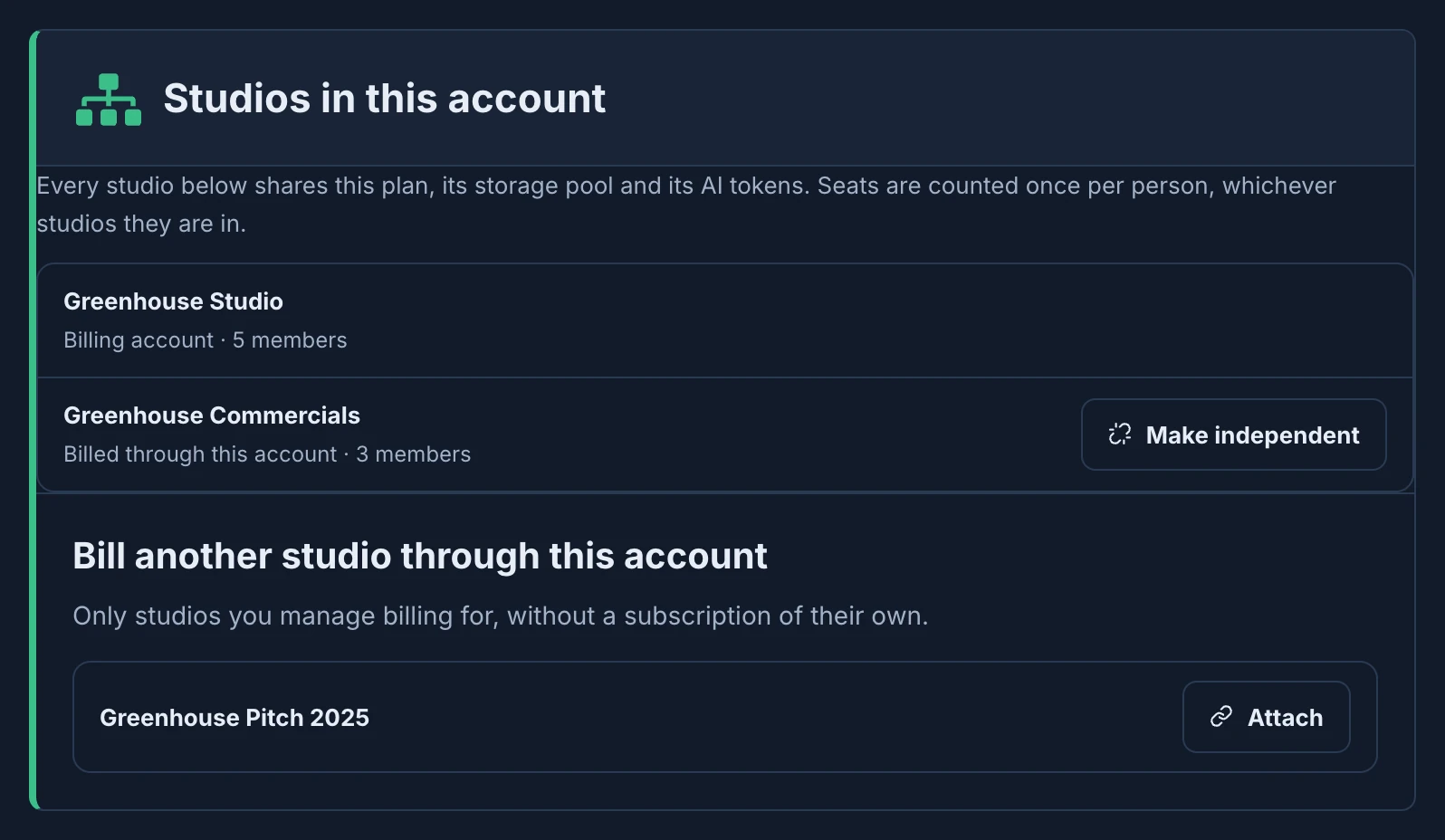
- Attach, under Bill another studio through this account, adds a studio. You need to manage billing in both studios. The studio can't have a subscription of its own, or studios billed through it: cancel or detach those first. On a Free account, the people of both studios must still fit its seats.
- Make independent gives the studio back its own account, on the Free plan, or on Courtesy for a studio from before plans had limits. Billing managers of either studio can do it.
- A studio billed through another shows, at the top of its own Billing, This studio is billed through and the paying studio, with Open that account and Make independent.
Changes are charged at once
Attach and Make independent act on one click, without asking, and change the seats of the subscription. Adding a member adds a seat the same way, and adding a storage block changes the subscription the same day, all prorated.
Courtesy from Animanager
Animanager can give a studio a courtesy, such as more tokens every month or more storage, for a while or with no end. Billing shows it under Courtesy, for example Courtesy from Animanager: +5 GB of storage until and the date.