
Appearance
Download files a studio shared with you
A studio can send you a link to download work files: a scene, its textures and caches, a video. You need no Animanager account and nothing to install.
If the studio sent you a version to watch and comment on instead, see Review a studio's work from a link.
Open the link
Open the link the studio sent you. A password link first shows Protected file link: type the password and press Open files.
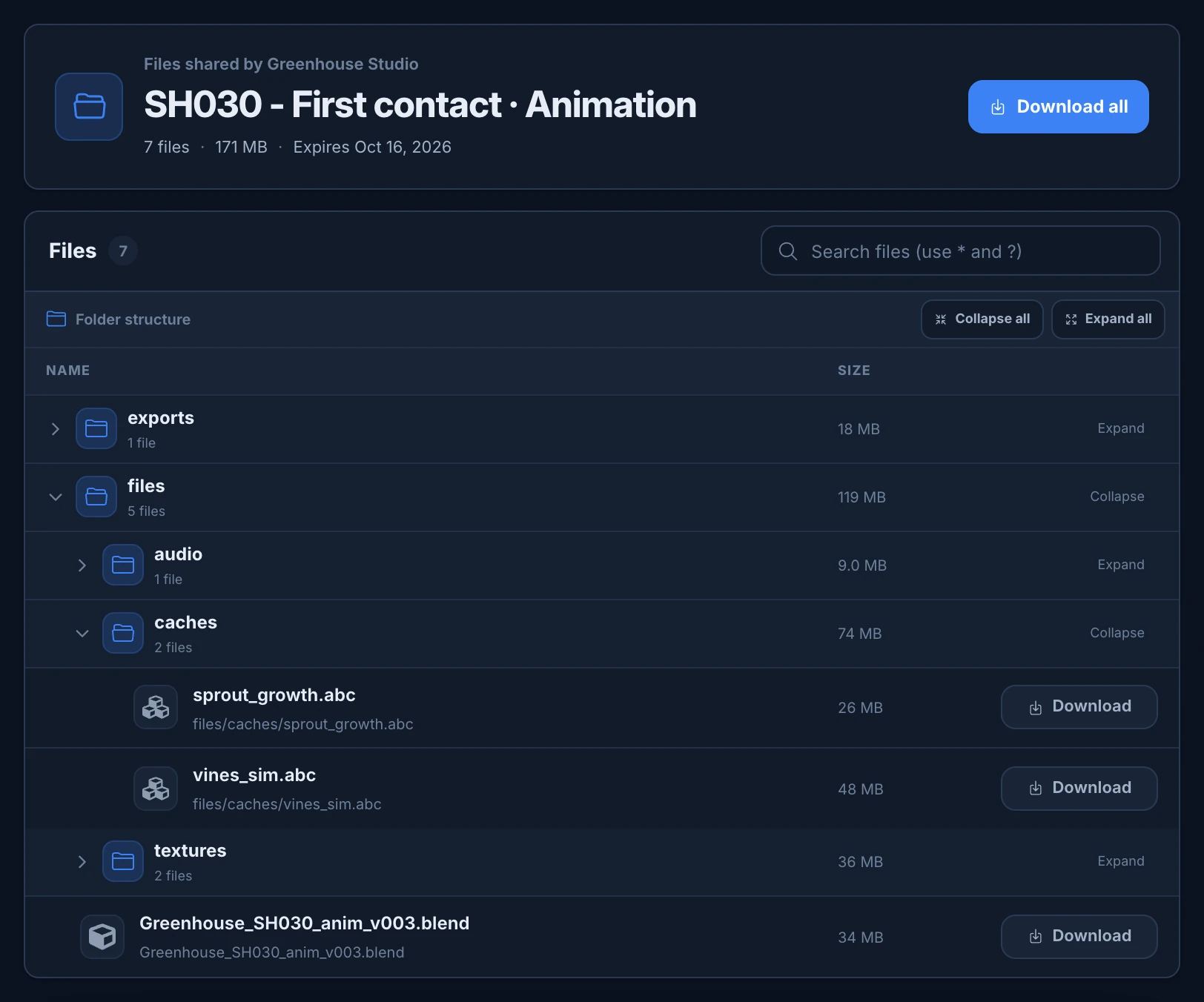
The page shows, at the top, Files shared by and the studio's name, the name of the delivery, such as SH030 - First contact · Animation, how many files it holds, their total size and, when the link has one, its end date.
Download
- Download all downloads everything. With one file, the file itself. With several, your browser gathers them into one zip, named after the delivery and with the same folders: the button counts the files as they come (Preparing 3/7), then Creating ZIP…, and the page says "ZIP ready with 7 files."
- Download, on a file, downloads only that one, with its own name.
The zip is made in your browser, so very large deliveries take time and memory. If it fails, the page says "The ZIP could not be created. You can still download each file separately."
The download links renew by themselves: you can leave the page open and come back later, as long as the link itself hasn't expired.
Find a file
- Files counts the files. Under it, folders come first, in alphabetical order, then the files, each with its size. A folder shows how many files it holds and their total size.
- Click a folder to open or close it. Folders that hold other folders start open. Collapse all and Expand all close or open every folder.
- Search files (use * and ?) looks for a name or a folder, in upper or lower case.
*stands for any number of characters and?for one:*.abcfinds every cache, androbot_shell_*.exrevery texture of the robot's shell. While you search, every folder opens and the count shows, for example, 2 of 7.
When nothing matches, the page says No files found.
On a phone, the Download buttons show only their icon, and the sizes are hidden.
If the link doesn't open
| Message | What to do |
|---|---|
| This link has expired | The studio set an end date. Ask the sender for a new link. |
| This link was revoked | The studio turned it off. Ask the sender for a new link. |
| Link not found | Check that you copied the whole link. |
| A file is unavailable | A file of the delivery is no longer there. Ask the sender for a new link. |
| Incorrect password | Check the password with the sender. |
Try again loads the page again.