
Appearance
Find and reuse generations
Everything generated on a canvas is listed in its Generations panel, even results someone deleted from the board. Use it to find the take Maya made yesterday, copy a prompt that worked, or run a generator again with the same settings.
Open the panel
In the canvas window of an item, click the history icon in the tabs at the right edge (Show the generations). The panel isn't in the canvas shown inside the item, only in the canvas window. See Generate images and video on the canvas.
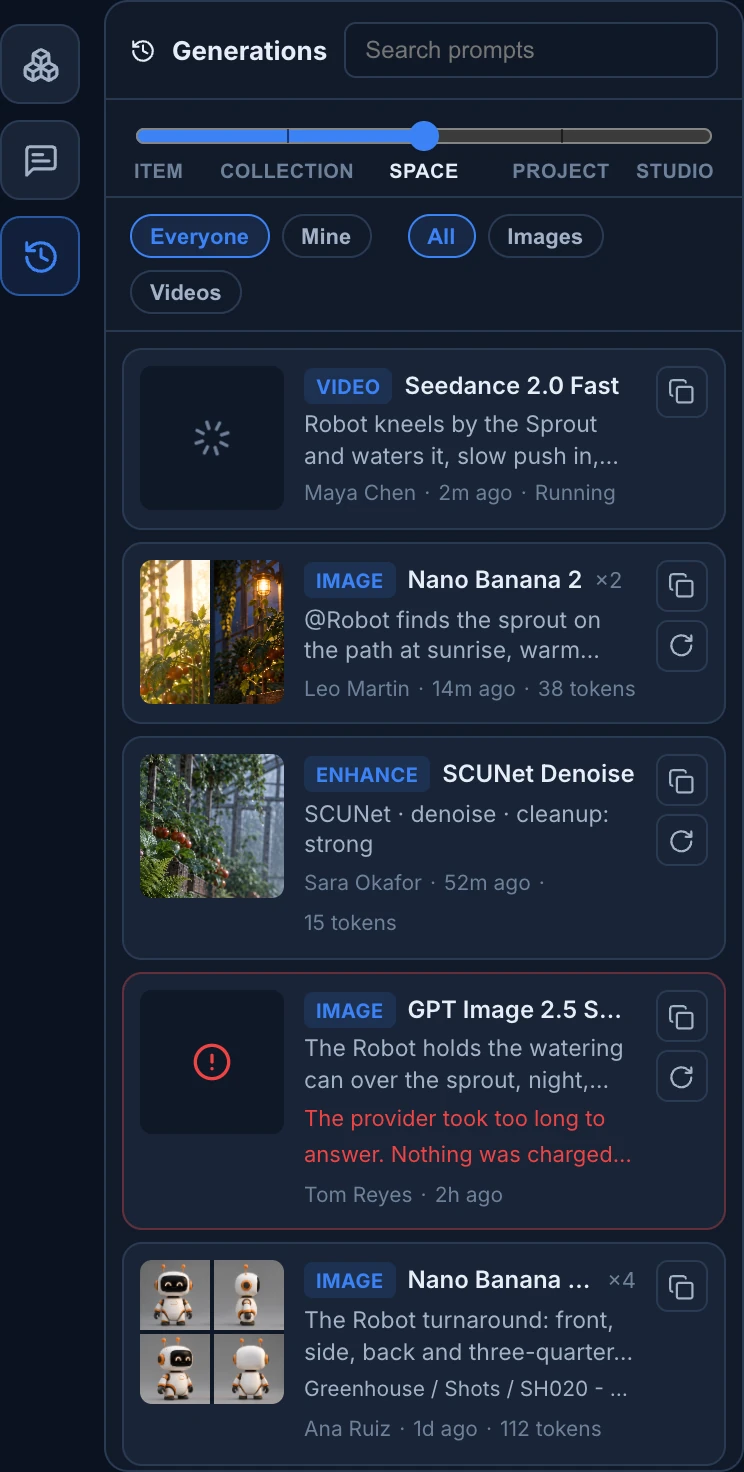
Filter the list
- Search prompts finds a word in the prompt or the model's name: "sunrise", "Seedance".
- The slider chooses how far to look: Item (this canvas), Collection, Space, Project or Studio. Animanager remembers it for the studio.
- Everyone or Mine, and All, Images or Videos.
Each row shows up to four results, the kind (Image, Video, SFX, Enhance, Background or 3D), the model and how many it made, the prompt, who ran it, when and what it cost in tokens. A row that is still running says Running or Queued, and a failed one shows the reason. A generation from another canvas also names where it was made.
The list grows as you scroll, and refreshes on its own while something runs.
Use a generation
- Click a row (Show on the canvas) to move the board to its results, or to its generator if the results are gone. A generation of another item says Go to its canvas and opens that canvas.
- Drag a thumbnail onto the board to place a copy of that result, also from another item's canvas.
- Copy prompt puts the prompt on your clipboard.
- Run the generator again runs the same node with its current settings, when it is on this canvas and not already running.
To download results, select them on the board and right-click Download, or Download as ZIP for several.
Notifications
When a generation you started finishes, a notification arrives in the feed. Click it to open the canvas on the result. Opening the canvas marks its generation notifications as read.
What it cost
The cost on each row is in tokens, the same as the generator's button. The tokens pill in the canvas toolbar adds up everything generated on this canvas, deleted results included; click it for the totals of the item, collection, space and project. See Choose a model and see what it costs.